Chromebook vs Notebook Which Is Right for You?

When you're weighing a Chromebook against a traditional notebook, you're not just comparing hardware specs. You're choosing between two fundamentally different philosophies of computing. One is built for the speed and simplicity of the web, and the other is a self-contained powerhouse designed for just about anything. Getting this distinction right is the first, most critical step.
The core of the debate is this: Chromebooks are cloud-first devices designed for online tasks, while traditional notebooks are all-purpose machines built for powerful offline software. Your final choice hinges on whether you value streamlined, web-based work or need the raw power and broad software compatibility of a local machine.
Understanding the Core Difference in Chromebook vs Notebook
So, what does "cloud-first" actually mean in practice? A Chromebook runs on Google’s Chrome OS, which is essentially the Chrome web browser supercharged into a full operating system. This lean design makes it incredibly fast to start up, inherently secure, and optimised for web apps like Google Docs, streaming services, and, of course, browsing.
Traditional notebooks, running on giants like Microsoft Windows or Apple's macOS, are a different beast entirely. They're built to install and run a vast universe of complex software directly from their internal storage—from professional-grade video editors to heavy-duty data analysis tools.
A Tale of Two Philosophies
This philosophical divide has very real consequences. Because a Chromebook leans so heavily on the cloud, it can get by with less powerful internal hardware. That often translates to a lower price tag and seriously impressive battery life. They absolutely shine when your work lives on the web.
Notebooks, on the other hand, are engineered for versatility. They need beefier processors, more RAM, and larger storage drives to juggle demanding applications and keep massive files close at hand. This makes them the undisputed champion for professionals and creatives who rely on specific, high-performance software that simply doesn't have a web-based equivalent.
The real question isn’t “Which is better?” but “Which philosophy aligns with my day-to-day needs?” A Chromebook strips away the clutter for a focused, online life. A notebook gives you a powerful, do-anything toolkit for any task, whether you're online or off.
To give you a clearer picture of these foundational differences, let's break down how each device stacks up side-by-side.
The table below offers a quick snapshot of the primary distinctions, helping you see at a glance where each platform excels.
At a Glance: Chromebook vs Notebook Core Differences
| Attribute | Chromebook | Traditional Notebook (Windows/macOS) |
|---|---|---|
| Primary OS | Google Chrome OS | Microsoft Windows or Apple macOS |
| Main Focus | Cloud-based apps and web browsing | Local software installation and offline capability |
| Software Access | Google Play Store, web apps, Linux apps | Extensive libraries of desktop-grade software |
| Typical Use Case | Education, light productivity, web browsing | Professional work, creative tasks, gaming, general use |
| Hardware Needs | Lighter specs, less local storage | Powerful processors, more RAM, larger SSDs |
| Setup & Maintenance | Simple setup, automatic background updates | More complex setup, manual software updates required |
Ultimately, this table highlights the trade-offs. Chromebooks offer simplicity and efficiency for a connected world, while notebooks provide unmatched power and flexibility for more demanding, localised tasks.
Comparing Operating Systems and App Ecosystems
The operating system (OS) is the very soul of a computer. It dictates how you interact with your device and, ultimately, what you can achieve with it. The debate between a Chromebook and a traditional notebook boils down to a fundamental choice: the focused, web-centric world of Chrome OS versus the powerful, all-encompassing environments of Windows and macOS. This decision directly shapes your daily workflow and the software at your fingertips.
Chrome OS is built around a single, elegant principle: simplicity. Its user interface is clean, minimal, and essentially a direct extension of the Chrome browser. This design philosophy pays off with incredibly fast boot times, seamless background updates, and a system that feels snappy and responsive even on modest hardware.
Windows and macOS, on the other hand, are mature, feature-rich operating systems engineered for maximum versatility. They provide deep file management systems, extensive customisation options, and the raw power to handle complex, multi-application workflows entirely offline. This makes them the default choice for anyone needing a digital Swiss Army knife.
The Software and App Divide
The most significant practical difference reveals itself when you dig into the app ecosystems. A Chromebook’s software library is a unique hybrid, blending web applications, Android apps via the Google Play Store, and even Linux applications for those with more technical needs. This three-pronged approach covers an impressive amount of ground.
For everyday productivity, a Chromebook truly shines. You get the full suite of Google Workspace tools out of the box, and web-based suites have become incredibly capable—you can explore some great Microsoft Office alternatives to see for yourself. This cloud-first model also means your work is always saved and accessible from any device.
However, traditional notebooks still hold the crown for specialised, high-performance software. Their ecosystems are built on decades of desktop-grade applications that simply have no direct web or mobile equivalent.
The core of the software debate is this: Chromebooks are brilliant at accessing and running applications through the web, while notebooks are built to install and run powerful applications on the device itself.
Real-World App Scenarios
To really grasp this distinction, let’s consider two different professionals. A freelance writer who spends their day in Google Docs, researching online, and managing projects in a web-based tool will find a Chromebook to be a perfect, distraction-free companion. The streamlined OS keeps them locked in on the task at hand.
Now, imagine a course creator. They need to record high-quality video, edit it in Adobe Premiere Pro, design graphics in Photoshop, and produce audio in a dedicated Digital Audio Workstation (DAW). These are resource-intensive, desktop-only applications. For this creator, a powerful notebook isn't just a preference; it’s a necessity. The Chromebook’s app ecosystem simply isn’t built for this kind of professional workflow.
- Chromebook Ideal User: A student managing online coursework, a professional whose work lives in cloud collaboration tools, or a writer who values a simple and secure environment.
- Notebook Ideal User: A software developer using specialised IDEs, a graphic designer needing the full Adobe Creative Suite, or a scientist running complex data models.
When looking at software, it's worth remembering that the best Chrome extensions for productivity can add significant functionality to the Chrome OS experience, layering new capabilities directly into the browser.
Market Adoption and User Preference
Interestingly, browser popularity doesn't always translate into hardware adoption. In the Netherlands, for example, the Chrome browser dominates with a 57.09% market share across both desktop and mobile devices. Yet, Chrome OS itself powers just 1.68% of computers, while Windows commands a massive 69.82%.
This data suggests that most users in the region prefer the versatile software environment of a traditional notebook for their Chrome browsing. They value the ability to integrate their browser with a wider range of cultural, scientific, and creative tools that only a full-fledged OS can offer.
Ultimately, your choice should be guided by the specific tools you need to do your best work. Take the time to assess your current and future software requirements before making a final decision.
Diving into Performance, Hardware, and Battery Life
When you pop the hood, the design philosophies behind a Chromebook and a traditional notebook couldn't be more different. This isn't just about comparing numbers on a spec sheet; it's about understanding how each machine is engineered for a specific purpose. The end result is two wildly different user experiences, each fine-tuned for a particular workflow.
Chromebooks are masters of efficiency. They run on the incredibly lightweight Chrome OS, which sips resources compared to the demands of Windows or macOS. This operational leanness is why they feel so snappy and responsive, even with hardware that might seem modest on paper—think an Intel Celeron or MediaTek processor, 4GB of RAM, and eMMC storage.
This isn't a bug; it's a feature. Since most of the heavy lifting is done in the cloud, the local hardware doesn't need to be a powerhouse. This approach is precisely what keeps them affordable and is a central point in the Chromebook vs. notebook performance debate.
Notebooks: The Powerhouse Approach
Traditional notebooks, on the other hand, are built on the opposite principle. They're designed to be self-reliant workhorses, capable of running demanding software right from their internal components. To deliver a smooth, productive experience, this requires a much more muscular hardware setup.
Whether it’s video editing, data analysis, or just heavy-duty multitasking with dozens of browser tabs and apps running, a notebook needs serious power. That’s why you’ll typically find them equipped with beefier processors (like Intel Core i5/i7 or AMD Ryzen 5/7), 8GB of RAM as a common starting point, and fast Solid-State Drives (SSDs) for lightning-quick file access and app loading.
The performance difference isn't about one being "good" and the other "bad." It's about matching the right tool to the job. A Chromebook's hardware is tuned for streamlined cloud computing, while a notebook's is built for versatile, high-demand local processing.
Performance in a Real-World Context
Let's ground this in everyday scenarios. Picture a university student in an online lecture. They've got a video call running, a digital textbook open, and they're taking notes in a cloud document. A modern Chromebook is perfectly engineered for this kind of web-based multitasking and will handle it without breaking a sweat.
Now, imagine a data analyst working with a multi-gigabyte dataset. They need to run statistical software like R or Python, generate complex visualisations, and compile reports. This workflow demands the raw processing power and abundant memory you'd find in a traditional notebook. Trying to do this on a standard Chromebook would be an exercise in frustration.
Here’s a quick breakdown of how hardware choices align with user needs:
- Processor (CPU): A Chromebook's efficient CPU is ideal for web browsing and light productivity. A notebook's powerful CPU is essential for software development, content creation, and scientific computing.
- Memory (RAM): 4-8GB is plenty for a Chromebook's focused tasks. For professional notebook users, 16GB or more is often recommended to ensure smooth multitasking between heavy applications.
- Storage: Chromebooks use eMMC storage—faster than an old hard drive—for the OS and a few key files, relying on the cloud for everything else. Notebooks use much faster NVMe SSDs to store large applications and project files locally for instant access.
The Battery Life Equation
This hardware divide has a direct, and pretty significant, impact on battery life. With a lightweight OS and power-sipping components, Chromebooks often deliver incredible endurance. It’s not uncommon for a Chromebook to last an entire 10–12 hour workday or school day on a single charge.
This makes them a brilliant choice for people who are always on the move, like students hopping between classes or professionals working away from their desks. For those who need even more freedom, exploring options like the best power banks for laptops with USB-C can extend that mobile productivity even further.
Notebooks, with their more powerful hardware and resource-hungry operating systems, generally can't compete on battery life. While premium models have made huge strides in efficiency, they typically offer fewer unplugged hours than their Chromebook counterparts, especially when you push them with demanding tasks. The trade-off for all that power is a closer relationship with your nearest wall socket.
Security, Maintenance, and Build Quality: What Really Matters
Beyond the flashy specs and shiny screens lie two factors that truly define your long-term relationship with a laptop: security and durability. How a device defends against threats and withstands daily abuse are critical, and this is where Chromebooks and traditional notebooks reveal their core philosophies. One isn't inherently better, but they are fundamentally different.
Chromebooks were born with a security-first DNA. Chrome OS is a tightly controlled ecosystem, making it a remarkably tough nut for malware and viruses to crack. It's not magic; it's a deliberate design built on several automated layers that work silently in the background.
This "set it and forget it" approach means you spend virtually zero time worrying about security chores. The system protects itself without nagging you for updates or demanding you run scans. For anyone who just wants their tech to work, this is a massive plus.
The Security Models Compared
The way Chrome OS handles security is worlds away from Windows or macOS. Grasping these differences is key to choosing a device that matches your comfort level with digital self-defence.
- Automatic Updates: Chromebooks update themselves silently and automatically. You get the latest security patches without ever clicking a button or waiting through a restart cycle. It just happens.
- Sandboxing: Every single app and browser tab runs in its own sealed-off container, a "sandbox." If a malicious site somehow compromises one tab, the threat is trapped there. It can't infect anything else on the system.
- Verified Boot: Every time you turn on a Chromebook, it runs a self-check to make sure nothing has been tampered with. If it spots something wrong, it typically fixes itself, restoring the OS to a clean, trusted state.
Traditional notebooks on Windows or macOS give you far more control, but that control comes with responsibility. Both operating systems have powerful security tools, but you're in the driver's seat. You have to manage antivirus software, approve system updates, and be smart about what you download. To add another layer of protection, especially on public networks, services like the best VPN services become an essential part of the toolkit.
A Chromebook’s security is like a fortress with automated guards—it’s always on, always protecting. A notebook’s security is more like a customizable home alarm system; it’s powerful, but you are responsible for arming it and keeping it updated.
Examining Physical Build and Durability
Just like their software, the physical construction of these machines varies wildly. Build quality is less about the type of device and more about how much you're willing to spend, though some general trends are clear.
Many entry-level Chromebooks are built for survival. Think durable plastic shells designed to handle the chaos of a classroom or being tossed into a backpack. The priority is making them lightweight and affordable, not wrapping them in premium metals.
As you climb the price ladder, both categories start feeling much more premium. High-end notebooks like Dell's XPS series or Apple's MacBooks are famous for their rigid, all-metal bodies that feel incredibly solid and durable. But the premium Chromebook market is catching up fast, with brands like Framework offering devices that are not only tough but also designed to be repaired and upgraded for years to come.
Ultimately, your environment dictates what matters. A student's laptop needs to survive a very different life than one belonging to a professional working from a home office. Pay attention to the fundamentals: check for sturdy hinges, a keyboard that doesn't flex, and a chassis that feels solid in your hands, no matter which OS it runs.
Breaking Down Cost and Long-Term Value
The sticker price is the first thing most people see, and it often tells a misleading story. While Chromebooks are famous for their affordability, the real comparison between them and traditional notebooks comes down to the total cost of ownership (TCO) and long-term value. This means looking past the initial purchase and thinking about software, repairs, and how useful the device will still be in a few years.
On the surface, the numbers seem simple enough. You can find entry-level Chromebooks for well under €400, making them a fantastic choice for students or anyone with basic computing needs. In contrast, mid-range notebooks usually start around €600—where premium Chromebooks top out—and high-performance machines can easily sail past the €1,500 mark.
Calculating the Total Cost of Ownership
True value isn’t about what you pay today; it's about the total investment over the device's entire life. One of the biggest ongoing costs for a traditional notebook is software. A subscription to Microsoft 365, for instance, adds a recurring annual fee. Chromebook users, on the other hand, get the powerful and free Google Workspace suite right out of the box.
Repairability and longevity are also huge factors. Let's be honest, many budget devices in both categories are a nightmare to fix. But some manufacturers are changing that. Brands like Framework are now making highly modular Chromebooks and notebooks, letting you easily upgrade RAM or swap out a keyboard. This extends the machine's life and protects its value.
Evaluating a device's worth means shifting from "How much does it cost today?" to "What is the total investment over the next five years?" This includes software, potential repairs, and even its eventual resale value.
Thinking long-term is crucial. When it’s time to upgrade, knowing where to sell your laptop for a good price can seriously offset the cost of your next machine. Sometimes, that initial investment in a more durable or well-known brand pays for itself down the line.
Market Realities and Strategic Choices
Your local environment and your personal goals should also shape your decision. Here in the Netherlands, for example, Chrome OS holds a small but steady 1.68% of the market, while Windows absolutely dominates at 69.82%. This presents a clear strategic choice: do you go for the affordability of a niche product for simple tasks, or do you invest in the platform that runs nearly all professional software? You can dig into more stats about the Dutch OS market on Statcounter.
For a lifelong learner who just needs a device for online courses and research, a budget Chromebook is an incredible deal. It delivers everything you need with zero extra software costs.
But for a creative professional looking to master Adobe Creative Suite or a data analyst using specialised tools, a more expensive notebook isn't a luxury. It’s a necessary long-term investment in their career and productivity.
Which One Is Right for You?
The Chromebook versus notebook debate really boils down to you. Forget the spec sheets for a moment; the best choice comes from a clear-eyed look at your daily routines, your work, and where you're headed. We're moving past the technical weeds to give you straight-up, real-world advice for three kinds of users.
Don't ask, "Which laptop is better?" Instead, ask, "Which one is better for me?"
The Student and Lifelong Learner
For anyone spending their days in online classes, collaborating on Google Docs, or diving deep into web research, a Chromebook is a fantastic tool. The battery life is a lifesaver for back-to-back lectures, and the simple, secure OS keeps distractions and tech problems to a minimum. Let's not forget the price—it’s a huge plus.
But the story changes if your studies get specialised. An engineering student wrestling with CAD software, a designer running Adobe apps, or a data scientist using complex statistical tools will hit a wall. In these cases, a traditional notebook isn't just nice to have; it's essential. You need the raw processing power and software compatibility to handle that kind of demanding coursework.
The Creative Professional
If you make your living in a creative field, the choice is usually pretty clear. Graphic designers, video editors, music producers, and 3D artists live and breathe resource-hungry applications. Think Adobe Creative Suite or sophisticated Digital Audio Workstations (DAWs). This kind of work demands powerful processors, dedicated graphics cards, and mountains of RAM—hardware found almost exclusively in high-end notebooks.
For a creative professional, a notebook isn't just a tool; it's an investment in their craft. The ability to run industry-standard software without compromise is the most critical factor, making a powerful notebook the default choice.
Sure, a premium Chromebook can handle some light photo editing or cloud-based design tools. But it just can't compete with the localised muscle needed for professional-grade creative work. For these users, a powerful Windows or macOS machine is the only way to stay efficient and competitive.
The Business Professional
The business world is a bit more of a mixed bag. For professionals who are all-in on the cloud—using tools like Slack, managing projects in Asana, and living on email and video calls—a Chromebook is remarkably efficient. They're secure, dead simple to manage for IT teams, and cost-effective, making them a brilliant choice for organisations that have gone fully cloud-native.
On the other hand, if your job involves specialised legacy software, massive Excel spreadsheets with complex macros, or connecting to old-school corporate networks, a Chromebook can feel like a straitjacket. A traditional notebook offers the flexibility to run just about anything, ensuring you can plug into any corporate IT environment, no matter how old or quirky. The software your company relies on should be a major factor in your decision.
Still Have Questions? Let's Clear Things Up
Choosing between a Chromebook and a traditional notebook often comes down to a few specific, real-world questions. Let's tackle the most common ones we hear to help you iron out any last-minute doubts and make your decision with confidence.
This decision tree gives you a quick visual guide for matching a device to your main needs, whether you're a student, a creative, or a business professional.
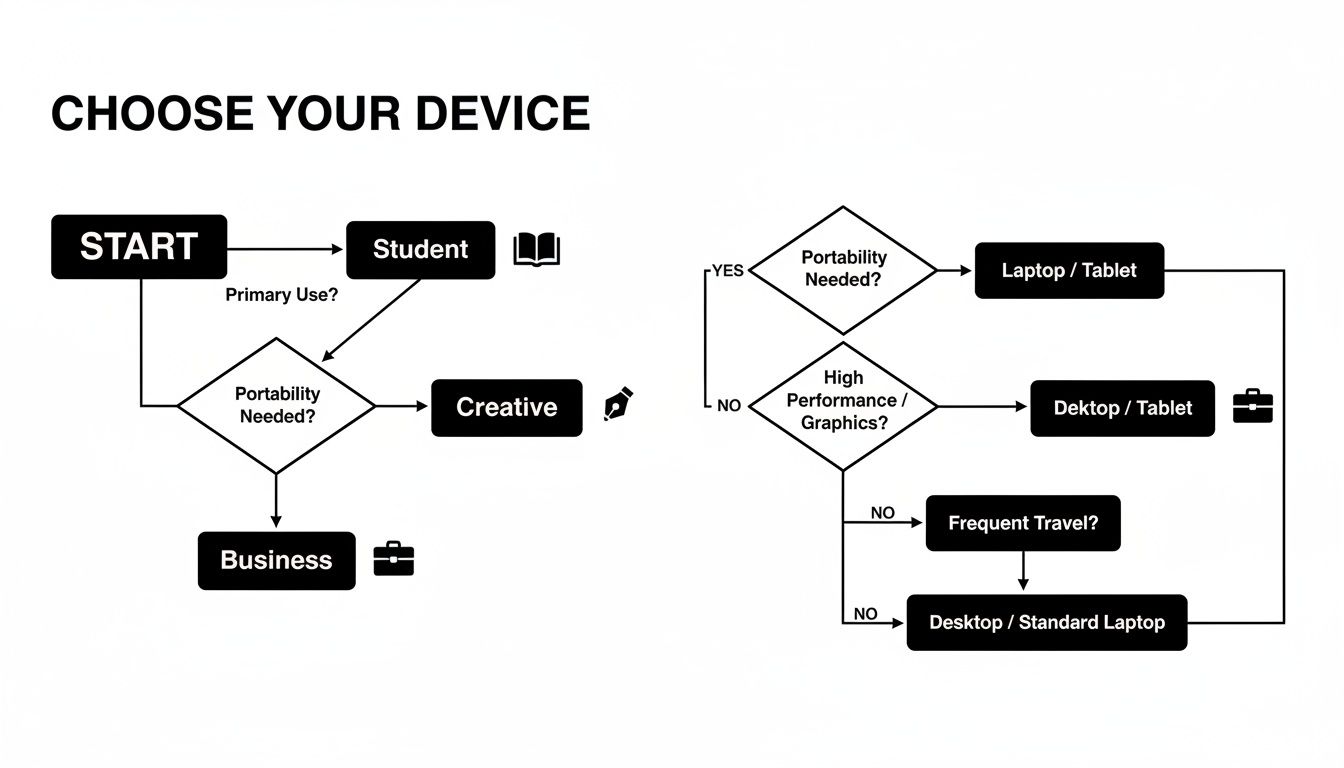
As the flowchart shows, it all boils down to one thing: your daily workflow and the specific software you can't live without are the most critical factors in this decision.
Can I Use Microsoft Office on a Chromebook?
Yes, but with a slight catch. You won't be running the full-fat desktop version. Instead, you can either use the very capable web-based Microsoft 365 apps (Word, Excel, and the rest) right in your browser or install the Android app versions from the Google Play Store. For most people, these get the job done perfectly.
However, if your work depends on advanced features like complex macros in Excel or very specific desktop-only functions, a traditional notebook running Windows or macOS is still your best bet.
Are Chromebooks Useless Without the Internet?
Not anymore. Early Chromebooks definitely earned that reputation, but modern ones have come a long way with their offline skills. You can work on Google Docs, Sheets, and Slides offline without a problem, and all your changes will sync up the moment you reconnect. Plus, many Android apps are designed to work offline, too.
So, while they are built as cloud-first machines, they're no longer completely tethered to an internet connection for getting basic work done.
Which One Is Better for Gaming?
For any kind of serious gaming, a traditional notebook—especially a Windows machine—wins hands down. There's no contest. Notebooks can be kitted out with powerful, dedicated graphics cards and processors that are essential for running demanding AAA game titles smoothly.
A Chromebook can handle Android games from the Play Store and tap into cloud gaming services like NVIDIA GeForce NOW. But it just doesn't have the raw hardware to run high-end PC games natively. For a top-tier gaming experience, a powerful notebook is the standard for a reason.
At People & Media B.V., we believe in the power of lifelong learning. Whether you're a student, a professional, or a curious mind, our platform offers courses, articles, and events designed to help you gain wisdom and grow. Explore our multidisciplinary perspectives on culture, science, and creativity at https://www.peopleandmedia.com.

Responses